Meeting Deadlines & Dates

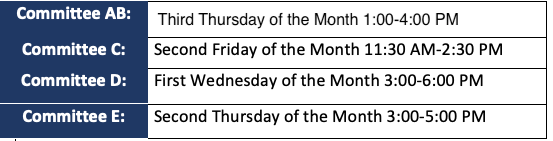
For details including a combined calendar of meeting deadlines and dates for all five IRB committees as well as separate tables for each Committee’s meeting deadlines, dates, locations, and times for the 2024 official calendar year click the corresponding button below.
The schedule applies to submissions requiring review at a convened IRB meeting (full board review). Submissions that may be eligible for expedited review, exempt review, or non-human subject research determinations are reviewed on a rolling basis upon submission of all necessary materials and are not required to meet submissions deadlines for review by the convened IRB (full board review). For more information regarding the different levels of review, please see the section titled “What are the different review options?” on the IRB 101 page. Please note final determinations regarding the level of review required are made by the IRB.
Meetings: Deadlines, Dates, Location, & Times
Deadlines for all IRB Committee Meetings are on the same day of the week as the committee meeting and fall three weeks prior to the scheduled meeting date. Any applications that you believe may require review at a full board meeting must be submitted by the meeting’s corresponding deadline to be considered for inclusion on the meeting agenda.
Locations for the meetings vary for all committees. For meeting locations for a specific committee, please check the respective committee’s meeting schedule table. Meeting deadlines and dates for all committees follow a regular schedule but are subject to change. Due to holidays, room availability, and/or the academic calendar, not all meeting deadlines and/or dates follow the regular schedule, location and/or time and are marked by an asterisk ( * ).
Meetings Schedules